install.packages("brickster")Getting Started with Brickster: R for Databricks
Connect to Databricks from R using the brickster package
brickster
R
Tutorials
Learn how to use the brickster R package to connect to Databricks, explore Unity Catalog, run SQL queries, and analyse data with dplyr.
NoteLive Execution
All the code in this tutorial is rendered against a Databricks workspace before publication.
Noteconnect.R — Project Helper
This tutorial uses a shared helper at _databricks/connect.R that loads credentials from .env and auto-discovers your SQL Warehouse. Here’s the full source:
library(brickster)
library(DBI)

# Load .env file if it exists (mirrors Python's python-dotenv behaviour)
# Walk up from working directory to find .env
find_env_file <- function() {
  dir <- getwd()
  while (dir != dirname(dir)) {
    candidate <- file.path(dir, ".env")
    if (file.exists(candidate)) return(candidate)
    dir <- dirname(dir)
  }
  NULL
}

env_file <- find_env_file()
if (!is.null(env_file)) {
  readRenviron(env_file)
}

#' Get a DBI connection to Databricks via brickster
#'
#' Reads DATABRICKS_HOST and DATABRICKS_TOKEN from environment variables.
#' If DATABRICKS_WAREHOUSE_ID is set, uses it directly. Otherwise,
#' auto-discovers the first available SQL warehouse.
#'
#' @param warehouse_id SQL Warehouse ID (optional — auto-discovers if not set)
#' @return A DBI connection object
get_databricks_connection <- function(warehouse_id = Sys.getenv("DATABRICKS_WAREHOUSE_ID")) {
  if (nchar(warehouse_id) == 0) {
    message("DATABRICKS_WAREHOUSE_ID not set, discovering warehouses...")
    warehouses <- db_sql_warehouse_list()
    if (length(warehouses) == 0) {
      stop("No SQL Warehouses found. Create one in the Databricks UI.")
    }
    warehouse_id <- warehouses[[1]]$id
    message("Using warehouse: ", warehouses[[1]]$name, " (", warehouse_id, ")")
  }
  dbConnect(
    DatabricksSQL(),
    warehouse_id = warehouse_id
  )
}
Summary
- Brickster is an R package from Databricks Labs that provides native R integration with Databricks — no ODBC driver required
- You’ll install brickster, connect to a Databricks workspace, and explore Unity Catalog (catalogs, schemas, tables)
- We’ll install dplyr on a Databricks cluster, run SQL queries, and use dplyr verbs to analyse the Bakehouse sample dataset
- Finally, we’ll show how you could write results back to a new Delta table
What is Brickster?
Brickster is a Databricks Labs R package that gives R users first-class access to Databricks workspaces. Where Python users have databricks-connect, R users have brickster.
Key features:
- DBI backend — Standard R database connectivity via
dbConnect(DatabricksSQL(), ...) - dbplyr integration — Write dplyr code that translates to Databricks SQL automatically
- Unity Catalog API — Browse and manage catalogs, schemas, tables, and volumes programmatically
- Cluster management — Start, stop, and install libraries on clusters from R
- No ODBC required — Connects directly via the Databricks SQL Statement Execution API
- RStudio integration — Browse workspace resources via the Connections Pane with
open_workspace()
Prerequisites
Before you begin, make sure you have:
- R >= 4.1.0 installed
- A Databricks workspace with a SQL Warehouse available
- A Personal Access Token (or OAuth configured) for authentication
- Access to the Bakehouse sample dataset in Unity Catalog (available by default in most workspaces)
Install brickster from CRAN:
Load the libraries we’ll use throughout:
library(brickster)Warning: package 'brickster' was built under R version 4.4.3library(DBI)
library(dplyr)
Attaching package: 'dplyr'The following objects are masked from 'package:stats':
filter, lagThe following objects are masked from 'package:base':
intersect, setdiff, setequal, unionStep 1: Setup Connection
Brickster reads authentication credentials from environment variables. Store them in a .env file in your project root (or in .Renviron for global access) so they’re never hard-coded in your scripts.
Create a .env file in your project root:
DATABRICKS_HOST=https://<your-workspace>.cloud.databricks.com
DATABRICKS_TOKEN=<your-personal-access-token>
TipOptional: SQL Warehouse ID
If you know your SQL Warehouse ID, add DATABRICKS_WAREHOUSE_ID=<id> to your .env file. If not, brickster can auto-discover the first available warehouse in your workspace.
Our project helper at _databricks/connect.R loads the .env file automatically and handles warehouse discovery:
source("../../_databricks/connect.R")
con <- get_databricks_connection()
DATABRICKS_WAREHOUSE_ID not set, discovering warehouses...Using warehouse: Serverless Starter Warehouse (c732306bf3906f4d)Verify the connection works:
dbGetQuery(con, "SELECT current_catalog(), current_schema()")i Submitting queryv Submitting query [796ms]i Fetching 1 rowsv Downloaded 1 rows [521ms]i Processing resultsv Processing results [12ms]# A tibble: 1 x 2
`current_catalog()` `current_schema()`
<chr> <chr>
1 hive_metastore default Step 2: List Catalogs
Unity Catalog organises data in a three-level namespace: catalog > schema > table. Let’s start by listing the catalogs available in your workspace:
catalogs <- db_uc_catalogs_list()This returns a list of all catalogs you have access to. You should see at least main (the default) and samples (Databricks sample data).
NoteOutput: db_uc_catalogs_list()
[[1]]
[[1]]$name
[1] "samples"

[[1]]$owner
[1] "System user"

[[1]]$comment
[1] "These sample datasets are made available by third party data providers as well as open data sources. You can learn more about each data set by clicking on each one.\n\nTo discover more instantly available, free data sets across a wide range of industry use cases, visit [Databricks Marketplace](/marketplace).\n\nPlease note that the third party data sets represent a reduced portion of the available data attributes, volume, and data types available from providers, and are intended for educational rather than production purposes."

[[1]]$catalog_type
[1] "SYSTEM_CATALOG"

[[1]]$metastore_id
[1] "473e68a6-17da-4dab-b4ab-c9959df3a2c5"

[[1]]$created_at
[1] 1.768904e+12

[[1]]$created_by
[1] "System user"

[[1]]$updated_at
[1] 1.77146e+12

[[1]]$updated_by
[1] "System user"

[[1]]$isolation_mode
[1] "OPEN"

[[1]]$accessible_in_current_workspace
[1] TRUE

[[1]]$browse_only
[1] FALSE

[[1]]$provisioning_info
[[1]]$provisioning_info$state
[1] "ACTIVE"


[[1]]$id
[1] "7784a1df-de20-49da-8043-a75229b890fc"

[[1]]$full_name
[1] "samples"

[[1]]$securable_type
[1] "CATALOG"

[[1]]$securable_kind
[1] "CATALOG_SYSTEM"

[[1]]$resource_name
[1] "/metastores/473e68a6-17da-4dab-b4ab-c9959df3a2c5/catalogs/7784a1df-de20-49da-8043-a75229b890fc"

[[1]]$delta_sharing_valid_through_timestamp
[1] 1.77146e+12

[[1]]$metastore_version
[1] -1

[[1]]$cache_version_info
[[1]]$cache_version_info$metastore_version
[1] -1


[[2]]
[[2]]$name
[1] "system"

[[2]]$owner
[1] "System user"

[[2]]$comment
[1] "System catalog (auto-created)"

[[2]]$catalog_type
[1] "SYSTEM_CATALOG"

[[2]]$metastore_id
[1] "473e68a6-17da-4dab-b4ab-c9959df3a2c5"

[[2]]$created_at
[1] 1.768904e+12

[[2]]$created_by
[1] "System user"

[[2]]$updated_at
[1] 1.770988e+12

[[2]]$updated_by
[1] "System user"

[[2]]$isolation_mode
[1] "OPEN"

[[2]]$accessible_in_current_workspace
[1] TRUE

[[2]]$browse_only
[1] FALSE

[[2]]$provisioning_info
[[2]]$provisioning_info$state
[1] "ACTIVE"


[[2]]$id
[1] "34f4e46c-9d9e-4a54-9217-fa01d21f5d13"

[[2]]$full_name
[1] "system"

[[2]]$securable_type
[1] "CATALOG"

[[2]]$securable_kind
[1] "CATALOG_SYSTEM"

[[2]]$resource_name
[1] "/metastores/473e68a6-17da-4dab-b4ab-c9959df3a2c5/catalogs/34f4e46c-9d9e-4a54-9217-fa01d21f5d13"

[[2]]$delta_sharing_valid_through_timestamp
[1] 1.770988e+12

[[2]]$metastore_version
[1] -1

[[2]]$cache_version_info
[[2]]$cache_version_info$metastore_version
[1] -1
Step 3: Get a Catalog
Drill into a specific catalog to see its metadata:
samples_catalog <- db_uc_catalogs_get(catalog = "samples")This returns details like the catalog owner, creation time, and any comments attached to it.
NoteOutput: db_uc_catalogs_get()
$name
[1] "samples"

$owner
[1] "System user"

$comment
[1] "These sample datasets are made available by third party data providers as well as open data sources. You can learn more about each data set by clicking on each one.\n\nTo discover more instantly available, free data sets across a wide range of industry use cases, visit [Databricks Marketplace](/marketplace).\n\nPlease note that the third party data sets represent a reduced portion of the available data attributes, volume, and data types available from providers, and are intended for educational rather than production purposes."

$catalog_type
[1] "SYSTEM_CATALOG"

$metastore_id
[1] "473e68a6-17da-4dab-b4ab-c9959df3a2c5"

$created_at
[1] 1.768904e+12

$created_by
[1] "System user"

$updated_at
[1] 1.77146e+12

$updated_by
[1] "System user"

$isolation_mode
[1] "OPEN"

$browse_only
[1] FALSE

$provisioning_info
$provisioning_info$state
[1] "ACTIVE"


$id
[1] "7784a1df-de20-49da-8043-a75229b890fc"

$full_name
[1] "samples"

$securable_type
[1] "CATALOG"

$securable_kind
[1] "CATALOG_SYSTEM"

$resource_name
[1] "/metastores/473e68a6-17da-4dab-b4ab-c9959df3a2c5/catalogs/7784a1df-de20-49da-8043-a75229b890fc"

$delta_sharing_valid_through_timestamp
[1] 1.77146e+12

$metastore_version
[1] 199

$cache_version_info
$cache_version_info$metastore_version
[1] 199
Step 4: List Tables in a Schema
Now let’s navigate into the Bakehouse schema and see what tables are available. First, list the schemas in the samples catalog:
schemas <- db_uc_schemas_list(catalog = "samples")
NoteOutput: db_uc_schemas_list()
[[1]]
[[1]]$name
[1] "accuweather"

[[1]]$catalog_name
[1] "samples"

[[1]]$owner
[1] "System user"

[[1]]$metastore_id
[1] "473e68a6-17da-4dab-b4ab-c9959df3a2c5"

[[1]]$full_name
[1] "samples.accuweather"

[[1]]$created_at
[1] 1.768904e+12

[[1]]$created_by
[1] "System user"

[[1]]$updated_at
[1] 1.768904e+12

[[1]]$updated_by
[1] "System user"

[[1]]$catalog_type
[1] "SYSTEM_CATALOG"

[[1]]$schema_id
[1] "1cd49a6c-8b95-4430-8001-ff5ccc82f2ab"

[[1]]$delta_sharing_valid_through_timestamp
[1] 1.768904e+12

[[1]]$securable_type
[1] "SCHEMA"

[[1]]$securable_kind
[1] "SCHEMA_SYSTEM_DELTASHARING"

[[1]]$browse_only
[1] FALSE

[[1]]$metastore_version
[1] -1

[[1]]$provider_id
[1] "5882aec0-be20-4493-9bad-d04f93c1c2ce"

[[1]]$share_name
[1] "system_schemas_accuweather_share"

[[1]]$cache_version_info
[[1]]$cache_version_info$metastore_version
[1] -1


[[2]]
[[2]]$name
[1] "bakehouse"

[[2]]$catalog_name
[1] "samples"

[[2]]$owner
[1] "System user"

[[2]]$metastore_id
[1] "473e68a6-17da-4dab-b4ab-c9959df3a2c5"

[[2]]$full_name
[1] "samples.bakehouse"

[[2]]$created_at
[1] 1.768904e+12

[[2]]$created_by
[1] "System user"

[[2]]$updated_at
[1] 1.77146e+12

[[2]]$updated_by
[1] "System user"

[[2]]$catalog_type
[1] "SYSTEM_CATALOG"

[[2]]$provisioning_info
[[2]]$provisioning_info$state
[1] "ACTIVE"


[[2]]$schema_id
[1] "9973e8cf-dec7-4b0b-b2ab-615724b9d07b"

[[2]]$delta_sharing_valid_through_timestamp
[1] 1.77146e+12

[[2]]$securable_type
[1] "SCHEMA"

[[2]]$securable_kind
[1] "SCHEMA_SYSTEM_DELTASHARING"

[[2]]$browse_only
[1] FALSE

[[2]]$metastore_version
[1] -1

[[2]]$provider_id
[1] "5882aec0-be20-4493-9bad-d04f93c1c2ce"

[[2]]$share_name
[1] "system_schemas_bakehouse_share"

[[2]]$cache_version_info
[[2]]$cache_version_info$metastore_version
[1] -1


[[3]]
[[3]]$name
[1] "healthverity"

[[3]]$catalog_name
[1] "samples"

[[3]]$owner
[1] "System user"

[[3]]$metastore_id
[1] "473e68a6-17da-4dab-b4ab-c9959df3a2c5"

[[3]]$full_name
[1] "samples.healthverity"

[[3]]$created_at
[1] 1.768905e+12

[[3]]$created_by
[1] "System user"

[[3]]$updated_at
[1] 1.76912e+12

[[3]]$updated_by
[1] "System user"

[[3]]$catalog_type
[1] "SYSTEM_CATALOG"

[[3]]$provisioning_info
[[3]]$provisioning_info$state
[1] "ACTIVE"


[[3]]$schema_id
[1] "0e15daec-007e-46ef-8df6-cabe58e10b55"

[[3]]$delta_sharing_valid_through_timestamp
[1] 1.76912e+12

[[3]]$securable_type
[1] "SCHEMA"

[[3]]$securable_kind
[1] "SCHEMA_SYSTEM_DELTASHARING"

[[3]]$browse_only
[1] FALSE

[[3]]$metastore_version
[1] -1

[[3]]$provider_id
[1] "5882aec0-be20-4493-9bad-d04f93c1c2ce"

[[3]]$share_name
[1] "system_schemas_healthverity_share"

[[3]]$cache_version_info
[[3]]$cache_version_info$metastore_version
[1] -1


[[4]]
[[4]]$name
[1] "information_schema"

[[4]]$catalog_name
[1] "samples"

[[4]]$owner
[1] "System user"

[[4]]$comment
[1] "Information schema (auto-created)"

[[4]]$metastore_id
[1] "473e68a6-17da-4dab-b4ab-c9959df3a2c5"

[[4]]$full_name
[1] "samples.information_schema"

[[4]]$created_at
[1] 1.768904e+12

[[4]]$created_by
[1] "System user"

[[4]]$updated_at
[1] 1.768904e+12

[[4]]$updated_by
[1] "System user"

[[4]]$catalog_type
[1] "SYSTEM_CATALOG"

[[4]]$schema_id
[1] "346bca9d-fb45-421c-bb5d-c584b3f692d9"

[[4]]$securable_type
[1] "SCHEMA"

[[4]]$securable_kind
[1] "SCHEMA_SYSTEM"

[[4]]$browse_only
[1] FALSE

[[4]]$metastore_version
[1] -1

[[4]]$cache_version_info
[[4]]$cache_version_info$metastore_version
[1] -1


[[5]]
[[5]]$name
[1] "nyctaxi"

[[5]]$catalog_name
[1] "samples"

[[5]]$owner
[1] "System user"

[[5]]$metastore_id
[1] "473e68a6-17da-4dab-b4ab-c9959df3a2c5"

[[5]]$full_name
[1] "samples.nyctaxi"

[[5]]$created_at
[1] 1.768904e+12

[[5]]$created_by
[1] "System user"

[[5]]$updated_at
[1] 1.77146e+12

[[5]]$updated_by
[1] "System user"

[[5]]$catalog_type
[1] "SYSTEM_CATALOG"

[[5]]$provisioning_info
[[5]]$provisioning_info$state
[1] "ACTIVE"


[[5]]$schema_id
[1] "a3c86988-adf7-405f-9338-543fd8870a69"

[[5]]$delta_sharing_valid_through_timestamp
[1] 1.77146e+12

[[5]]$securable_type
[1] "SCHEMA"

[[5]]$securable_kind
[1] "SCHEMA_SYSTEM_DELTASHARING"

[[5]]$browse_only
[1] FALSE

[[5]]$metastore_version
[1] -1

[[5]]$provider_id
[1] "5882aec0-be20-4493-9bad-d04f93c1c2ce"

[[5]]$share_name
[1] "system_schemas_nyctaxi_share"

[[5]]$cache_version_info
[[5]]$cache_version_info$metastore_version
[1] -1


[[6]]
[[6]]$name
[1] "tpcds_sf1"

[[6]]$catalog_name
[1] "samples"

[[6]]$owner
[1] "System user"

[[6]]$metastore_id
[1] "473e68a6-17da-4dab-b4ab-c9959df3a2c5"

[[6]]$full_name
[1] "samples.tpcds_sf1"

[[6]]$created_at
[1] 1.768905e+12

[[6]]$created_by
[1] "System user"

[[6]]$updated_at
[1] 1.768905e+12

[[6]]$updated_by
[1] "System user"

[[6]]$catalog_type
[1] "SYSTEM_CATALOG"

[[6]]$schema_id
[1] "783d4867-db8f-40db-8abe-ef0513c03733"

[[6]]$delta_sharing_valid_through_timestamp
[1] 1.768905e+12

[[6]]$securable_type
[1] "SCHEMA"

[[6]]$securable_kind
[1] "SCHEMA_SYSTEM_DELTASHARING"

[[6]]$browse_only
[1] FALSE

[[6]]$metastore_version
[1] -1

[[6]]$provider_id
[1] "5882aec0-be20-4493-9bad-d04f93c1c2ce"

[[6]]$share_name
[1] "system_schemas_tpcds_sf1_share"

[[6]]$cache_version_info
[[6]]$cache_version_info$metastore_version
[1] -1


[[7]]
[[7]]$name
[1] "tpcds_sf1000"

[[7]]$catalog_name
[1] "samples"

[[7]]$owner
[1] "System user"

[[7]]$metastore_id
[1] "473e68a6-17da-4dab-b4ab-c9959df3a2c5"

[[7]]$full_name
[1] "samples.tpcds_sf1000"

[[7]]$created_at
[1] 1.768905e+12

[[7]]$created_by
[1] "System user"

[[7]]$updated_at
[1] 1.768905e+12

[[7]]$updated_by
[1] "System user"

[[7]]$catalog_type
[1] "SYSTEM_CATALOG"

[[7]]$schema_id
[1] "a1a0b9a1-2103-46e1-97d2-60e36b1e07a4"

[[7]]$delta_sharing_valid_through_timestamp
[1] 1.768905e+12

[[7]]$securable_type
[1] "SCHEMA"

[[7]]$securable_kind
[1] "SCHEMA_SYSTEM_DELTASHARING"

[[7]]$browse_only
[1] FALSE

[[7]]$metastore_version
[1] -1

[[7]]$provider_id
[1] "5882aec0-be20-4493-9bad-d04f93c1c2ce"

[[7]]$share_name
[1] "system_schemas_tpcds_sf1000_share"

[[7]]$cache_version_info
[[7]]$cache_version_info$metastore_version
[1] -1


[[8]]
[[8]]$name
[1] "tpch"

[[8]]$catalog_name
[1] "samples"

[[8]]$owner
[1] "System user"

[[8]]$metastore_id
[1] "473e68a6-17da-4dab-b4ab-c9959df3a2c5"

[[8]]$full_name
[1] "samples.tpch"

[[8]]$created_at
[1] 1.768904e+12

[[8]]$created_by
[1] "System user"

[[8]]$updated_at
[1] 1.77146e+12

[[8]]$updated_by
[1] "System user"

[[8]]$catalog_type
[1] "SYSTEM_CATALOG"

[[8]]$provisioning_info
[[8]]$provisioning_info$state
[1] "ACTIVE"


[[8]]$schema_id
[1] "a1ebcf87-a2b1-4c3e-8843-f71b2a9eebd3"

[[8]]$delta_sharing_valid_through_timestamp
[1] 1.77146e+12

[[8]]$securable_type
[1] "SCHEMA"

[[8]]$securable_kind
[1] "SCHEMA_SYSTEM_DELTASHARING"

[[8]]$browse_only
[1] FALSE

[[8]]$metastore_version
[1] -1

[[8]]$provider_id
[1] "5882aec0-be20-4493-9bad-d04f93c1c2ce"

[[8]]$share_name
[1] "system_schemas_tpch_share"

[[8]]$cache_version_info
[[8]]$cache_version_info$metastore_version
[1] -1


[[9]]
[[9]]$name
[1] "wanderbricks"

[[9]]$catalog_name
[1] "samples"

[[9]]$owner
[1] "System user"

[[9]]$metastore_id
[1] "473e68a6-17da-4dab-b4ab-c9959df3a2c5"

[[9]]$full_name
[1] "samples.wanderbricks"

[[9]]$created_at
[1] 1.768905e+12

[[9]]$created_by
[1] "System user"

[[9]]$updated_at
[1] 1.768905e+12

[[9]]$updated_by
[1] "System user"

[[9]]$catalog_type
[1] "SYSTEM_CATALOG"

[[9]]$schema_id
[1] "3d68a6ae-c0fc-4020-b439-d7fe375e42f7"

[[9]]$delta_sharing_valid_through_timestamp
[1] 1.768905e+12

[[9]]$securable_type
[1] "SCHEMA"

[[9]]$securable_kind
[1] "SCHEMA_SYSTEM_DELTASHARING"

[[9]]$browse_only
[1] FALSE

[[9]]$metastore_version
[1] -1

[[9]]$provider_id
[1] "5882aec0-be20-4493-9bad-d04f93c1c2ce"

[[9]]$share_name
[1] "system_schemas_wanderbricks_share"

[[9]]$cache_version_info
[[9]]$cache_version_info$metastore_version
[1] -1
Then list the tables in the bakehouse schema:
tables <- db_uc_tables_list(catalog = "samples", schema = "bakehouse")You should see tables like sales_transactions, sales_customers, sales_franchises, and sales_suppliers.
NoteOutput: db_uc_tables_list()
[[1]]
[[1]]$name
[1] "media_customer_reviews"

[[1]]$catalog_name
[1] "samples"

[[1]]$schema_name
[1] "bakehouse"

[[1]]$table_type
[1] "MANAGED"

[[1]]$data_source_format
[1] "DELTA"

[[1]]$storage_location
[1] "abfss://metastore@ucstprdeastus.dfs.core.windows.net/92d417bd-c99d-4fc6-8cb2-aada3029ea89/tables/71bc6830-bf01-4a23-92d9-68c067021781"

[[1]]$comment
[1] "The **Bakehouse Dataset** simulates a bakery franchise business and contains several key datasets for various analytical and AI-driven use cases. Please note that this sample dataset has been synthetically curated and is suitable for any Databricks workload.\n\nSample use cases for this dataset include:\n\n* **Building Data Pipelines with Delta Live Tables**: Create automated, real-time data pipelines for efficient data ingestion, transformation, and management.\n* **Performing Analytics with Databricks SQL**: Conduct powerful SQL-based analytics to uncover actionable insights from structured data, including sales trends and customer behavior.\n* **Exploring AI and Machine Learning Capabilities**: Use the dataset to develop and train machine learning models, applying AI to forecast trends, optimize operations, and predict customer preferences."

[[1]]$securable_kind
[1] "TABLE_DELTASHARING"

[[1]]$generation
[1] 0

[[1]]$metastore_id
[1] "473e68a6-17da-4dab-b4ab-c9959df3a2c5"

[[1]]$full_name
[1] "samples.bakehouse.media_customer_reviews"

[[1]]$data_access_configuration_id
[1] "00000000-0000-0000-0000-000000000000"

[[1]]$created_at
[1] 1.768904e+12

[[1]]$updated_at
[1] 1.768904e+12

[[1]]$table_id
[1] "3869ffc3-841a-4aab-b199-1ff8a30ff624"

[[1]]$delta_runtime_properties_kvpairs
named list()

[[1]]$securable_type
[1] "TABLE"

[[1]]$browse_only
[1] FALSE

[[1]]$delta_sharing_type
named list()

[[1]]$delta_sharing_valid_through_timestamp
[1] 1.768904e+12

[[1]]$metastore_version
[1] -1

[[1]]$share_name
[1] "system_schemas_bakehouse_share"

[[1]]$provider_id
[1] "5882aec0-be20-4493-9bad-d04f93c1c2ce"

[[1]]$schema_id
[1] "9973e8cf-dec7-4b0b-b2ab-615724b9d07b"

[[1]]$catalog_id
[1] "7784a1df-de20-49da-8043-a75229b890fc"

[[1]]$row_filters
named list()

[[1]]$cache_version_info
[[1]]$cache_version_info$metastore_version
[1] -1

[[1]]$cache_version_info$security_policy_checksum
[1] -1


[[1]]$etag
[1] "CAESCAAAAZva5HQp"


[[2]]
[[2]]$name
[1] "media_gold_reviews_chunked"

[[2]]$catalog_name
[1] "samples"

[[2]]$schema_name
[1] "bakehouse"

[[2]]$table_type
[1] "MANAGED"

[[2]]$data_source_format
[1] "DELTA"

[[2]]$storage_location
[1] "abfss://metastore@ucstprdeastus.dfs.core.windows.net/92d417bd-c99d-4fc6-8cb2-aada3029ea89/tables/0bcc8668-1f42-4bef-928f-1c3e7aa9bf14"

[[2]]$comment
[1] "The **Bakehouse Dataset** simulates a bakery franchise business and contains several key datasets for various analytical and AI-driven use cases. Please note that this sample dataset has been synthetically curated and is suitable for any Databricks workload.\n\nSample use cases for this dataset include:\n\n* **Building Data Pipelines with Delta Live Tables**: Create automated, real-time data pipelines for efficient data ingestion, transformation, and management.\n* **Performing Analytics with Databricks SQL**: Conduct powerful SQL-based analytics to uncover actionable insights from structured data, including sales trends and customer behavior.\n* **Exploring AI and Machine Learning Capabilities**: Use the dataset to develop and train machine learning models, applying AI to forecast trends, optimize operations, and predict customer preferences."

[[2]]$securable_kind
[1] "TABLE_DELTASHARING"

[[2]]$generation
[1] 0

[[2]]$metastore_id
[1] "473e68a6-17da-4dab-b4ab-c9959df3a2c5"

[[2]]$full_name
[1] "samples.bakehouse.media_gold_reviews_chunked"

[[2]]$data_access_configuration_id
[1] "00000000-0000-0000-0000-000000000000"

[[2]]$created_at
[1] 1.768904e+12

[[2]]$updated_at
[1] 1.768904e+12

[[2]]$table_id
[1] "04fea062-3838-4d8c-b094-dfddb08b72fe"

[[2]]$delta_runtime_properties_kvpairs
named list()

[[2]]$securable_type
[1] "TABLE"

[[2]]$browse_only
[1] FALSE

[[2]]$delta_sharing_type
named list()

[[2]]$delta_sharing_valid_through_timestamp
[1] 1.768904e+12

[[2]]$metastore_version
[1] -1

[[2]]$share_name
[1] "system_schemas_bakehouse_share"

[[2]]$provider_id
[1] "5882aec0-be20-4493-9bad-d04f93c1c2ce"

[[2]]$schema_id
[1] "9973e8cf-dec7-4b0b-b2ab-615724b9d07b"

[[2]]$catalog_id
[1] "7784a1df-de20-49da-8043-a75229b890fc"

[[2]]$row_filters
named list()

[[2]]$cache_version_info
[[2]]$cache_version_info$metastore_version
[1] -1

[[2]]$cache_version_info$security_policy_checksum
[1] -1


[[2]]$etag
[1] "CAESCAAAAZva5HQ5"


[[3]]
[[3]]$name
[1] "sales_customers"

[[3]]$catalog_name
[1] "samples"

[[3]]$schema_name
[1] "bakehouse"

[[3]]$table_type
[1] "MANAGED"

[[3]]$data_source_format
[1] "DELTA"

[[3]]$storage_location
[1] "abfss://metastore@ucstprdeastus.dfs.core.windows.net/92d417bd-c99d-4fc6-8cb2-aada3029ea89/tables/4258b0c6-b4d8-4b2d-8a5d-26b979c83100"

[[3]]$comment
[1] "The **Bakehouse Dataset** simulates a bakery franchise business and contains several key datasets for various analytical and AI-driven use cases. Please note that this sample dataset has been synthetically curated and is suitable for any Databricks workload.\n\nSample use cases for this dataset include:\n\n* **Building Data Pipelines with Delta Live Tables**: Create automated, real-time data pipelines for efficient data ingestion, transformation, and management.\n* **Performing Analytics with Databricks SQL**: Conduct powerful SQL-based analytics to uncover actionable insights from structured data, including sales trends and customer behavior.\n* **Exploring AI and Machine Learning Capabilities**: Use the dataset to develop and train machine learning models, applying AI to forecast trends, optimize operations, and predict customer preferences."

[[3]]$securable_kind
[1] "TABLE_DELTASHARING"

[[3]]$generation
[1] 18

[[3]]$metastore_id
[1] "473e68a6-17da-4dab-b4ab-c9959df3a2c5"

[[3]]$full_name
[1] "samples.bakehouse.sales_customers"

[[3]]$data_access_configuration_id
[1] "00000000-0000-0000-0000-000000000000"

[[3]]$created_at
[1] 1.768904e+12

[[3]]$updated_at
[1] 1.771447e+12

[[3]]$table_id
[1] "faf6d936-9a77-4e54-99f7-82770f1643ba"

[[3]]$delta_runtime_properties_kvpairs
named list()

[[3]]$securable_type
[1] "TABLE"

[[3]]$browse_only
[1] FALSE

[[3]]$provisioning_info
[[3]]$provisioning_info$state
[1] "ACTIVE"


[[3]]$delta_sharing_type
named list()

[[3]]$delta_sharing_valid_through_timestamp
[1] 1.771447e+12

[[3]]$metastore_version
[1] -1

[[3]]$share_name
[1] "system_schemas_bakehouse_share"

[[3]]$provider_id
[1] "5882aec0-be20-4493-9bad-d04f93c1c2ce"

[[3]]$schema_id
[1] "9973e8cf-dec7-4b0b-b2ab-615724b9d07b"

[[3]]$catalog_id
[1] "7784a1df-de20-49da-8043-a75229b890fc"

[[3]]$row_filters
named list()

[[3]]$cache_version_info
[[3]]$cache_version_info$metastore_version
[1] -1

[[3]]$cache_version_info$security_policy_checksum
[1] -1


[[3]]$etag
[1] "CAESCAAAAZxyeAwT"


[[4]]
[[4]]$name
[1] "sales_franchises"

[[4]]$catalog_name
[1] "samples"

[[4]]$schema_name
[1] "bakehouse"

[[4]]$table_type
[1] "MANAGED"

[[4]]$data_source_format
[1] "DELTA"

[[4]]$storage_location
[1] "abfss://metastore@ucstprdeastus.dfs.core.windows.net/92d417bd-c99d-4fc6-8cb2-aada3029ea89/tables/b086ba4c-f190-4c91-b023-9c013079db34"

[[4]]$comment
[1] "The **Bakehouse Dataset** simulates a bakery franchise business and contains several key datasets for various analytical and AI-driven use cases. Please note that this sample dataset has been synthetically curated and is suitable for any Databricks workload.\n\nSample use cases for this dataset include:\n\n* **Building Data Pipelines with Delta Live Tables**: Create automated, real-time data pipelines for efficient data ingestion, transformation, and management.\n* **Performing Analytics with Databricks SQL**: Conduct powerful SQL-based analytics to uncover actionable insights from structured data, including sales trends and customer behavior.\n* **Exploring AI and Machine Learning Capabilities**: Use the dataset to develop and train machine learning models, applying AI to forecast trends, optimize operations, and predict customer preferences."

[[4]]$securable_kind
[1] "TABLE_DELTASHARING"

[[4]]$generation
[1] 0

[[4]]$metastore_id
[1] "473e68a6-17da-4dab-b4ab-c9959df3a2c5"

[[4]]$full_name
[1] "samples.bakehouse.sales_franchises"

[[4]]$data_access_configuration_id
[1] "00000000-0000-0000-0000-000000000000"

[[4]]$created_at
[1] 1.768904e+12

[[4]]$updated_at
[1] 1.768904e+12

[[4]]$table_id
[1] "9d2a4133-9b39-447f-9859-e39fdd910c5c"

[[4]]$delta_runtime_properties_kvpairs
named list()

[[4]]$securable_type
[1] "TABLE"

[[4]]$browse_only
[1] FALSE

[[4]]$delta_sharing_type
named list()

[[4]]$delta_sharing_valid_through_timestamp
[1] 1.768904e+12

[[4]]$metastore_version
[1] -1

[[4]]$share_name
[1] "system_schemas_bakehouse_share"

[[4]]$provider_id
[1] "5882aec0-be20-4493-9bad-d04f93c1c2ce"

[[4]]$schema_id
[1] "9973e8cf-dec7-4b0b-b2ab-615724b9d07b"

[[4]]$catalog_id
[1] "7784a1df-de20-49da-8043-a75229b890fc"

[[4]]$row_filters
named list()

[[4]]$cache_version_info
[[4]]$cache_version_info$metastore_version
[1] -1

[[4]]$cache_version_info$security_policy_checksum
[1] -1


[[4]]$etag
[1] "CAESCAAAAZva5HRY"


[[5]]
[[5]]$name
[1] "sales_suppliers"

[[5]]$catalog_name
[1] "samples"

[[5]]$schema_name
[1] "bakehouse"

[[5]]$table_type
[1] "MANAGED"

[[5]]$data_source_format
[1] "DELTA"

[[5]]$storage_location
[1] "abfss://metastore@ucstprdeastus.dfs.core.windows.net/92d417bd-c99d-4fc6-8cb2-aada3029ea89/tables/4006b092-829a-4c8a-b373-17c7081df717"

[[5]]$comment
[1] "The **Bakehouse Dataset** simulates a bakery franchise business and contains several key datasets for various analytical and AI-driven use cases. Please note that this sample dataset has been synthetically curated and is suitable for any Databricks workload.\n\nSample use cases for this dataset include:\n\n* **Building Data Pipelines with Delta Live Tables**: Create automated, real-time data pipelines for efficient data ingestion, transformation, and management.\n* **Performing Analytics with Databricks SQL**: Conduct powerful SQL-based analytics to uncover actionable insights from structured data, including sales trends and customer behavior.\n* **Exploring AI and Machine Learning Capabilities**: Use the dataset to develop and train machine learning models, applying AI to forecast trends, optimize operations, and predict customer preferences."

[[5]]$securable_kind
[1] "TABLE_DELTASHARING"

[[5]]$generation
[1] 17

[[5]]$metastore_id
[1] "473e68a6-17da-4dab-b4ab-c9959df3a2c5"

[[5]]$full_name
[1] "samples.bakehouse.sales_suppliers"

[[5]]$data_access_configuration_id
[1] "00000000-0000-0000-0000-000000000000"

[[5]]$created_at
[1] 1.768904e+12

[[5]]$updated_at
[1] 1.770137e+12

[[5]]$table_id
[1] "a9c33db9-d168-420a-bd5d-1a704e514f89"

[[5]]$delta_runtime_properties_kvpairs
named list()

[[5]]$securable_type
[1] "TABLE"

[[5]]$browse_only
[1] FALSE

[[5]]$provisioning_info
[[5]]$provisioning_info$state
[1] "ACTIVE"


[[5]]$delta_sharing_type
named list()

[[5]]$delta_sharing_valid_through_timestamp
[1] 1.770137e+12

[[5]]$metastore_version
[1] -1

[[5]]$share_name
[1] "system_schemas_bakehouse_share"

[[5]]$provider_id
[1] "5882aec0-be20-4493-9bad-d04f93c1c2ce"

[[5]]$schema_id
[1] "9973e8cf-dec7-4b0b-b2ab-615724b9d07b"

[[5]]$catalog_id
[1] "7784a1df-de20-49da-8043-a75229b890fc"

[[5]]$row_filters
named list()

[[5]]$cache_version_info
[[5]]$cache_version_info$metastore_version
[1] -1

[[5]]$cache_version_info$security_policy_checksum
[1] -1


[[5]]$etag
[1] "CAESCAAAAZwkYhfj"


[[6]]
[[6]]$name
[1] "sales_transactions"

[[6]]$catalog_name
[1] "samples"

[[6]]$schema_name
[1] "bakehouse"

[[6]]$table_type
[1] "MANAGED"

[[6]]$data_source_format
[1] "DELTA"

[[6]]$storage_location
[1] "abfss://metastore@ucstprdeastus.dfs.core.windows.net/92d417bd-c99d-4fc6-8cb2-aada3029ea89/tables/55ef1811-6327-47b1-a369-cc045a32289c"

[[6]]$comment
[1] "The **Bakehouse Dataset** simulates a bakery franchise business and contains several key datasets for various analytical and AI-driven use cases. Please note that this sample dataset has been synthetically curated and is suitable for any Databricks workload.\n\nSample use cases for this dataset include:\n\n* **Building Data Pipelines with Delta Live Tables**: Create automated, real-time data pipelines for efficient data ingestion, transformation, and management.\n* **Performing Analytics with Databricks SQL**: Conduct powerful SQL-based analytics to uncover actionable insights from structured data, including sales trends and customer behavior.\n* **Exploring AI and Machine Learning Capabilities**: Use the dataset to develop and train machine learning models, applying AI to forecast trends, optimize operations, and predict customer preferences."

[[6]]$securable_kind
[1] "TABLE_DELTASHARING"

[[6]]$generation
[1] 36

[[6]]$metastore_id
[1] "473e68a6-17da-4dab-b4ab-c9959df3a2c5"

[[6]]$full_name
[1] "samples.bakehouse.sales_transactions"

[[6]]$data_access_configuration_id
[1] "00000000-0000-0000-0000-000000000000"

[[6]]$created_at
[1] 1.768904e+12

[[6]]$updated_at
[1] 1.77146e+12

[[6]]$table_id
[1] "1d45c69a-ec10-46f8-abe0-2106bd12800a"

[[6]]$delta_runtime_properties_kvpairs
named list()

[[6]]$securable_type
[1] "TABLE"

[[6]]$browse_only
[1] FALSE

[[6]]$provisioning_info
[[6]]$provisioning_info$state
[1] "ACTIVE"


[[6]]$delta_sharing_type
named list()

[[6]]$delta_sharing_valid_through_timestamp
[1] 1.77146e+12

[[6]]$metastore_version
[1] -1

[[6]]$share_name
[1] "system_schemas_bakehouse_share"

[[6]]$provider_id
[1] "5882aec0-be20-4493-9bad-d04f93c1c2ce"

[[6]]$schema_id
[1] "9973e8cf-dec7-4b0b-b2ab-615724b9d07b"

[[6]]$catalog_id
[1] "7784a1df-de20-49da-8043-a75229b890fc"

[[6]]$row_filters
named list()

[[6]]$cache_version_info
[[6]]$cache_version_info$metastore_version
[1] -1

[[6]]$cache_version_info$security_policy_checksum
[1] -1


[[6]]$etag
[1] "CAESCAAAAZxzOjRe"
TipQuick Table Check
You can also check if a specific table exists:
db_uc_tables_exists(catalog = "samples", schema = "bakehouse", table = "sales_transactions")Step 5: Install dplyr on the Cluster
If you’re working with a Databricks cluster (rather than just a SQL Warehouse), you can install R packages directly onto it. Let’s install the latest version of dplyr:
cluster_id <- Sys.getenv("DATABRICKS_CLUSTER_ID")

db_libs_install(
  cluster_id = cluster_id,
  libraries = list(
    list(cran = list(package = "dplyr"))
  )
)

# Wait for the installation to complete
wait_for_lib_installs(cluster_id = cluster_id)
Check the installation status:
db_libs_cluster_status(cluster_id = cluster_id)
NoteSQL Warehouse vs Cluster
SQL Warehouses don’t support library installation — they come pre-configured. The db_libs_install() function is for all-purpose clusters where you need custom R packages. For this tutorial, all remaining examples use the SQL Warehouse connection via DBI, which doesn’t require cluster library installation.
Step 6: Run a SQL Query
The most direct way to query data is with dbGetQuery(). Let’s pull the first 10 sales transactions from the Bakehouse dataset:
sales <- dbGetQuery(
  con,
  "SELECT * FROM samples.bakehouse.sales_transactions LIMIT 10"
)
NoteOutput: SELECT * … LIMIT 10
# A tibble: 10 x 10
   transactionID customerID franchiseID dateTime            product     quantity
           <dbl>      <dbl>       <dbl> <dttm>              <chr>          <dbl>
 1       1002961    2000253     3000047 2024-05-14 12:17:01 Golden Gat~        8
 2       1003007    2000226     3000047 2024-05-10 23:10:10 Austin Alm~       36
 3       1003017    2000108     3000047 2024-05-16 16:34:10 Austin Alm~       40
 4       1003068    2000173     3000047 2024-05-02 04:31:51 Pearly Pies       28
 5       1003103    2000075     3000047 2024-05-04 23:44:26 Pearly Pies       28
 6       1003147    2000295     3000047 2024-05-15 16:17:06 Austin Alm~       32
 7       1003196    2000237     3000047 2024-05-07 11:13:22 Tokyo Tidb~       40
 8       1003329    2000272     3000047 2024-05-06 03:32:16 Outback Oa~       28
 9       1001264    2000209     3000047 2024-05-16 17:32:28 Pearly Pies       28
10       1001287    2000120     3000047 2024-05-15 08:41:28 Austin Alm~       40
# i 4 more variables: unitPrice <dbl>, totalPrice <dbl>, paymentMethod <chr>,
#   cardNumber <dbl>
You can run any Databricks SQL, including aggregations:
daily_revenue <- dbGetQuery(con, "
  SELECT
    DATE(dateTime) AS sale_date,
    COUNT(*) AS num_transactions,
    ROUND(SUM(totalPrice), 2) AS total_revenue,
    ROUND(AVG(totalPrice), 2) AS avg_transaction
  FROM samples.bakehouse.sales_transactions
  GROUP BY DATE(dateTime)
  ORDER BY sale_date DESC
  LIMIT 20
")
NoteOutput: Daily Revenue Aggregation
# A tibble: 17 x 4
   sale_date  num_transactions total_revenue avg_transaction
   <date>                <dbl>         <dbl>           <dbl>
 1 2024-05-17              106          1932            18.2
 2 2024-05-16              203          3714            18.3
 3 2024-05-15              192          3804            19.8
 4 2024-05-14              218          4221            19.4
 5 2024-05-13              229          4044            17.7
 6 2024-05-12              202          4398            21.8
 7 2024-05-11              206          3747            18.2
 8 2024-05-10              181          3729            20.6
 9 2024-05-09              219          4320            19.7
10 2024-05-08              219          3921            17.9
11 2024-05-07              191          3894            20.4
12 2024-05-06              195          4500            23.1
13 2024-05-05              181          3945            21.8
14 2024-05-04              190          3822            20.1
15 2024-05-03              204          4278            21.0
16 2024-05-02              190          4074            21.4
17 2024-05-01              207          4128            19.9
Step 7: Get a Table with dplyr
Brickster’s dbplyr integration lets you write dplyr code that gets translated to SQL and executed on Databricks. The data stays on the server until you call collect().
Create a lazy reference to the sales table:
sales_tbl <- tbl(con, I("samples.bakehouse.sales_transactions"))
NoteOutput: tbl() Preview
i Submitting queryv Submitting query [874ms]i Fetching 21 rowsv Downloaded 21 rows [107ms]i Processing resultsv Processing results [3ms]# Source: table<samples.bakehouse.sales_transactions> [?? x 10]
# Database: DatabricksConnection
transactionID customerID franchiseID dateTime product quantity
<dbl> <dbl> <dbl> <dttm> <chr> <dbl>
1 1002961 2000253 3000047 2024-05-14 12:17:01 Golden Gat~ 8
2 1003007 2000226 3000047 2024-05-10 23:10:10 Austin Alm~ 36
3 1003017 2000108 3000047 2024-05-16 16:34:10 Austin Alm~ 40
4 1003068 2000173 3000047 2024-05-02 04:31:51 Pearly Pies 28
5 1003103 2000075 3000047 2024-05-04 23:44:26 Pearly Pies 28
6 1003147 2000295 3000047 2024-05-15 16:17:06 Austin Alm~ 32
7 1003196 2000237 3000047 2024-05-07 11:13:22 Tokyo Tidb~ 40
8 1003329 2000272 3000047 2024-05-06 03:32:16 Outback Oa~ 28
9 1001264 2000209 3000047 2024-05-16 17:32:28 Pearly Pies 28
10 1001287 2000120 3000047 2024-05-15 08:41:28 Austin Alm~ 40
# i more rows
# i 4 more variables: unitPrice <dbl>, totalPrice <dbl>, paymentMethod <chr>,
# cardNumber <dbl>
TipThe I() Wrapper
Use I() around fully-qualified table names (catalog.schema.table) to tell dbplyr to treat the string as a literal identifier rather than trying to parse it.
Now use dplyr verbs — these translate to SQL behind the scenes:
top_products <- sales_tbl |>
  group_by(product) |>
  summarise(
    total_sold = n(),
    total_revenue = sum(totalPrice, na.rm = TRUE),
    avg_price = mean(unitPrice, na.rm = TRUE)
  ) |>
  arrange(desc(total_revenue)) |>
  head(10) |>
  collect()
NoteOutput: Top Products
# A tibble: 6 x 4
  product                total_sold total_revenue avg_price
  <chr>                       <dbl>         <dbl>     <dbl>
1 Golden Gate Ginger            586         11595         3
2 Outback Oatmeal               561         11199         3
3 Austin Almond Biscotti        530         11148         3
4 Tokyo Tidbits                 583         10986         3
5 Pearly Pies                   550         10785         3
6 Orchard Oasis                 523         10758         3
You can inspect the generated SQL with show_query():
sales_tbl |>
  group_by(product) |>
  summarise(total_sold = n()) |>
  arrange(desc(total_sold)) |>
  head(5) |>
  show_query()
Step 8: Basic Analysis
Let’s do some analysis on the Bakehouse data by combining dplyr operations and bringing the results into R.
Revenue by Franchise
franchise_revenue <- sales_tbl |>
  group_by(franchiseID) |>
  summarise(
    total_revenue = sum(totalPrice, na.rm = TRUE),
    num_transactions = n(),
    avg_transaction = mean(totalPrice, na.rm = TRUE)
  ) |>
  arrange(desc(total_revenue)) |>
  collect()
NoteOutput: Revenue by Franchise
# A tibble: 48 x 4
   franchiseID total_revenue num_transactions avg_transaction
         <dbl>         <dbl>            <dbl>           <dbl>
 1     3000046          6642               63           105.
 2     3000047          4512               60            75.2
 3     3000000          2790               83            33.6
 4     3000021          2514               64            39.3
 5     3000002          2502               76            32.9
 6     3000033          1482               90            16.5
 7     3000010          1479               82            18.0
 8     3000011          1404               86            16.3
 9     3000045          1392               82            17.0
10     3000030          1371               77            17.8
# i 38 more rows
Transaction Distribution
transaction_stats <- sales_tbl |>
  summarise(
    total_transactions = n(),
    min_amount = min(totalPrice, na.rm = TRUE),
    max_amount = max(totalPrice, na.rm = TRUE),
    avg_amount = mean(totalPrice, na.rm = TRUE)
  ) |>
  collect()
NoteOutput: Transaction Stats
# A tibble: 1 x 4
  total_transactions min_amount max_amount avg_amount
               <dbl>      <dbl>      <dbl>      <dbl>
1               3333          3        180       19.9
Monthly Trends
monthly_trends <- sales_tbl |>
  mutate(
    sale_month = date_trunc("month", dateTime)
  ) |>
  group_by(sale_month) |>
  summarise(
    revenue = sum(totalPrice, na.rm = TRUE),
    transactions = n()
  ) |>
  arrange(sale_month) |>
  collect()
NoteOutput: Monthly Trends
# A tibble: 1 x 3
  sale_month          revenue transactions
  <dttm>                <dbl>        <dbl>
1 2024-05-01 00:00:00   66471         3333
Transaction Heatmap by Day of Week and Hour
Once data is collected into R, you can use any R visualisation library. Here we use a custom theme_dailydatabricks() ggplot theme with the logo watermark.
Notetheme_dailydatabricks() — Custom ggplot Theme
library(ggplot2)
library(png)
library(grid)

# Load the logo for watermark
logo_img <- readPNG("Assets/logo-icon.png")
logo_grob <- rasterGrob(
  logo_img,
  x = unit(1, "npc") - unit(0.4, "cm"),
  y = unit(0.4, "cm"),
  hjust = 1, vjust = 0,
  width = unit(1.2, "cm"),
  interpolate = TRUE
)

# Custom DailyDatabricks theme
theme_dailydatabricks <- function(base_size = 12) {
  theme_minimal(base_size = base_size) %+replace%
    theme(
      plot.title = element_text(
        face = "bold", size = rel(1.3), hjust = 0,
        margin = margin(b = 8)
      ),
      plot.subtitle = element_text(
        size = rel(0.9), colour = "#666666", hjust = 0,
        margin = margin(b = 12)
      ),
      plot.caption = element_text(
        size = rel(0.7), colour = "#999999", hjust = 1
      ),
      axis.title = element_text(size = rel(0.85), colour = "#333333"),
      axis.text = element_text(size = rel(0.8), colour = "#555555"),
      panel.grid.major = element_line(colour = "#F0F0F0", linewidth = 0.4),
      panel.grid.minor = element_blank(),
      legend.position = "bottom",
      legend.title = element_text(size = rel(0.85)),
      legend.text = element_text(size = rel(0.75)),
      plot.margin = margin(15, 15, 15, 15)
    )
}
Let’s build a heatmap of transaction volume across day of week and hour of day — a useful way to spot when the bakery is busiest:
# Pull transaction counts by day of week and hour, computed on Databricks
heatmap_data <- sales_tbl |>
  mutate(
    dow = dayofweek(dateTime),
    hour = hour(dateTime)
  ) |>
  group_by(dow, hour) |>
  summarise(transactions = n(), .groups = "drop") |>
  collect() |>
  mutate(
    day_name = factor(
      dow,
      levels = 1:7,
      labels = c("Sun", "Mon", "Tue", "Wed", "Thu", "Fri", "Sat")
    ),
    hour_label = sprintf("%02d:00", hour)
  )
i Submitting queryv Submitting query [922ms]i Fetching 168 rowsv Downloaded 168 rows [102ms]i Processing resultsv Processing results [3ms]# Build the heatmap
p <- ggplot(heatmap_data, aes(x = hour, y = day_name, fill = transactions)) +
geom_tile(colour = "white", linewidth = 0.6) +
scale_fill_gradient(
low = "#FDEAEA",
high = "#CC3333",
name = "Transactions"
) +
scale_x_continuous(
breaks = seq(0, 23, 3),
labels = sprintf("%02d:00", seq(0, 23, 3)),
expand = c(0, 0)
) +
scale_y_discrete(expand = c(0, 0)) +
labs(
title = "Bakehouse Transaction Volume",
subtitle = "By day of week and hour of day",
x = NULL,
y = NULL,
caption = "dailydatabricks.tips"
) +
theme_dailydatabricks() +
annotation_custom(logo_grob)
p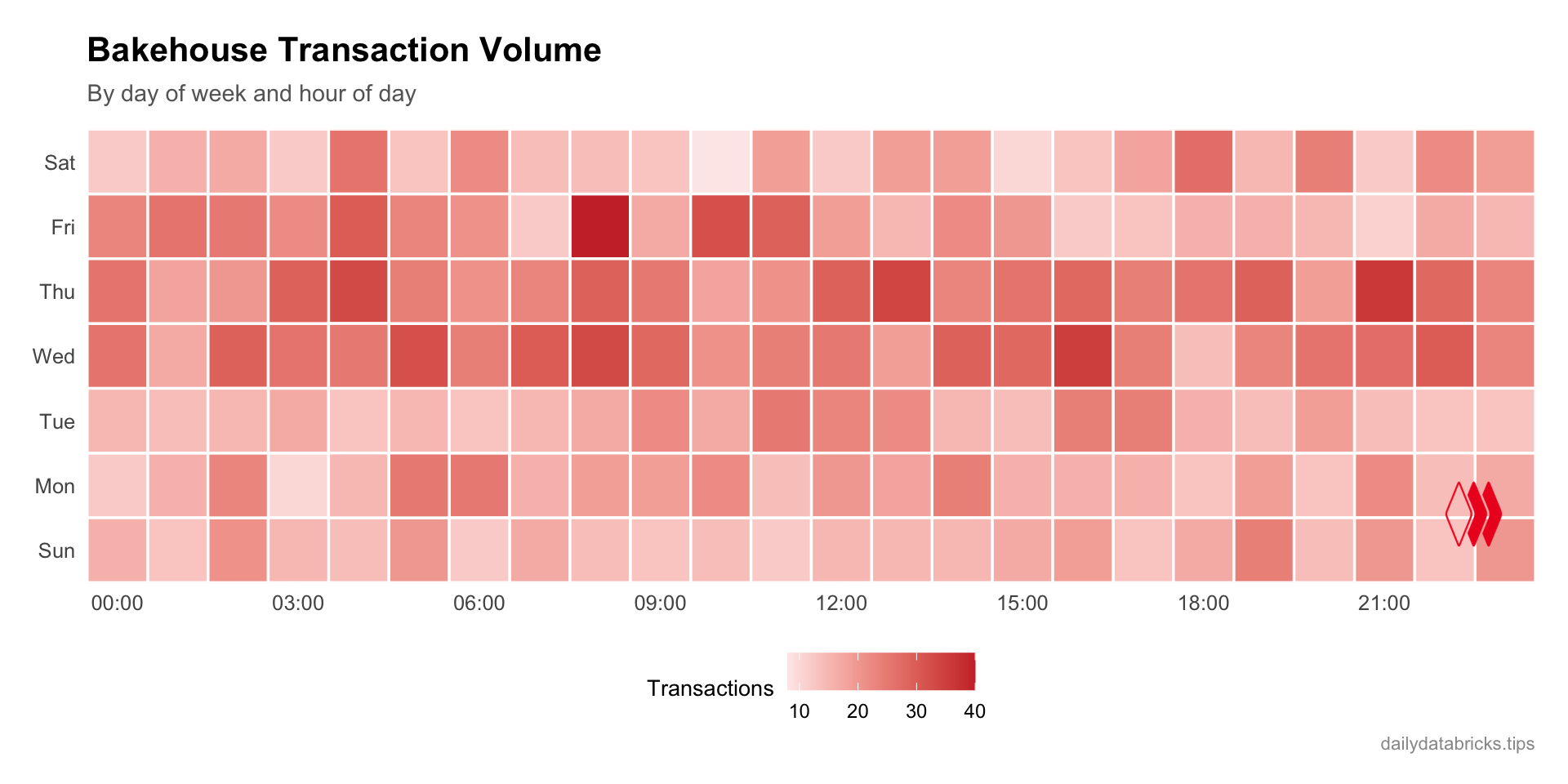
Step 9: Write Back to a New Table (Example Only)
WarningNot Executed
The code below demonstrates how to write data back to Databricks. It is shown but not executed to avoid creating tables in your workspace. Adjust the catalog, schema, and table names to match your environment before running.
For small datasets (under 50,000 rows), brickster uses inline SQL INSERT statements:
# Write the franchise revenue summary to a new table
dbWriteTable(
  con,
  name = "main.default.bakehouse_franchise_summary",
  value = franchise_revenue
)
For larger datasets, brickster stages the data as Parquet in a Unity Catalog volume before loading it. You need to specify a staging volume:
# For datasets > 50,000 rows, provide a staging volume
dbWriteTable(
  con,
  name = "main.default.bakehouse_large_analysis",
  value = large_result,
  staging_volume = "/Volumes/main/default/staging"
)
You can also use SQL to create tables from query results:
dbExecute(con, "
  CREATE TABLE main.default.bakehouse_monthly_trends AS
  SELECT
    DATE_TRUNC('month', dateTime) AS sale_month,
    SUM(totalPrice) AS revenue,
    COUNT(*) AS transactions
  FROM samples.bakehouse.sales_transactions
  GROUP BY DATE_TRUNC('month', dateTime)
")
TipOverwrite vs Append
By default, dbWriteTable() will fail if the table already exists. Use overwrite = TRUE to replace the table, or append = TRUE to add rows to an existing table.
Cleanup & Cost Management
Disconnect from the warehouse when you’re done:
dbDisconnect(con)
ImportantStop Compute Resources
Make sure to stop your SQL Warehouse in the Databricks UI when you’re finished to avoid unnecessary costs. If you started a cluster for library installation, stop that too.